
Updated October 2026 · Reviewed by Billy Forte
For a Missouri traffic ticket lookup, the main free tool is Case.net, the Missouri courts’ case information portal, where you can search by your name or by an exact case number. If your ticket is eligible, a Plead and Pay icon on your case page shows the fine and court costs and lets you pay online. Case.net does not list every city court, so if your case is not there, contact the court named on your ticket.
Key Facts
- The tool: Case.net, run by the Missouri Judiciary. See Case.net.
- Coverage: only courts on the statewide case system, which leaves out some city courts. See which courts show up.
- Searches: by name (last name required) or by exact case number. See how to search.
- Paying online: Plead and Pay works for eligible tickets, and paying in full is a guilty plea. See ways to pay.
- Points: the court reports a conviction to the DOR within 7 days. See what reaches the DOR.
Missouri Traffic Ticket Lookup on Case.net
The Missouri courts run Case.net. The courts call it “the Missouri Judiciary’s case information portal.”
It has limits you should know before you search:
- “Only case information from the statewide case management system is available through Case.net.”
- “Case.net will only return information open to the public.”
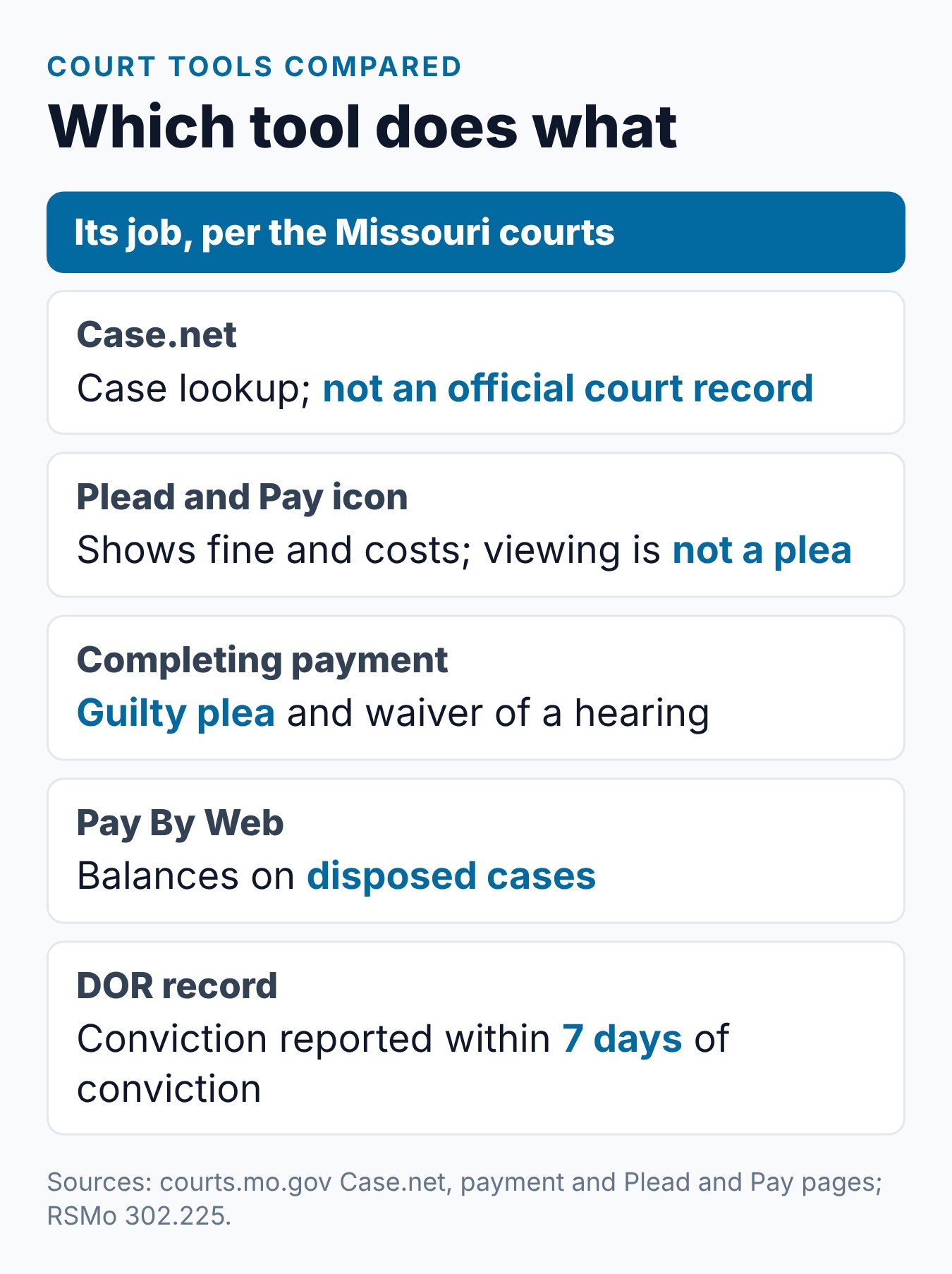
- “The information available on Case.net is provided as a service and is not considered an official court record.”
So Case.net is a lookup tool, not the official record. If something looks wrong, ask the court.
Which Courts Show Up
The name search covers “All Participating Courts.” The courts’ Case.net Search Help page says this means all trial court circuit and appellate locations.
City courts are different. The help page says municipal divisions appear only when they use “the statewide case management system.”
If your city court is not in the list, your ticket will not show on Case.net. In that case, call or visit the court named on your ticket.
How to Search Case.net
The help page lists several search types. These are the ones that fit a traffic ticket:
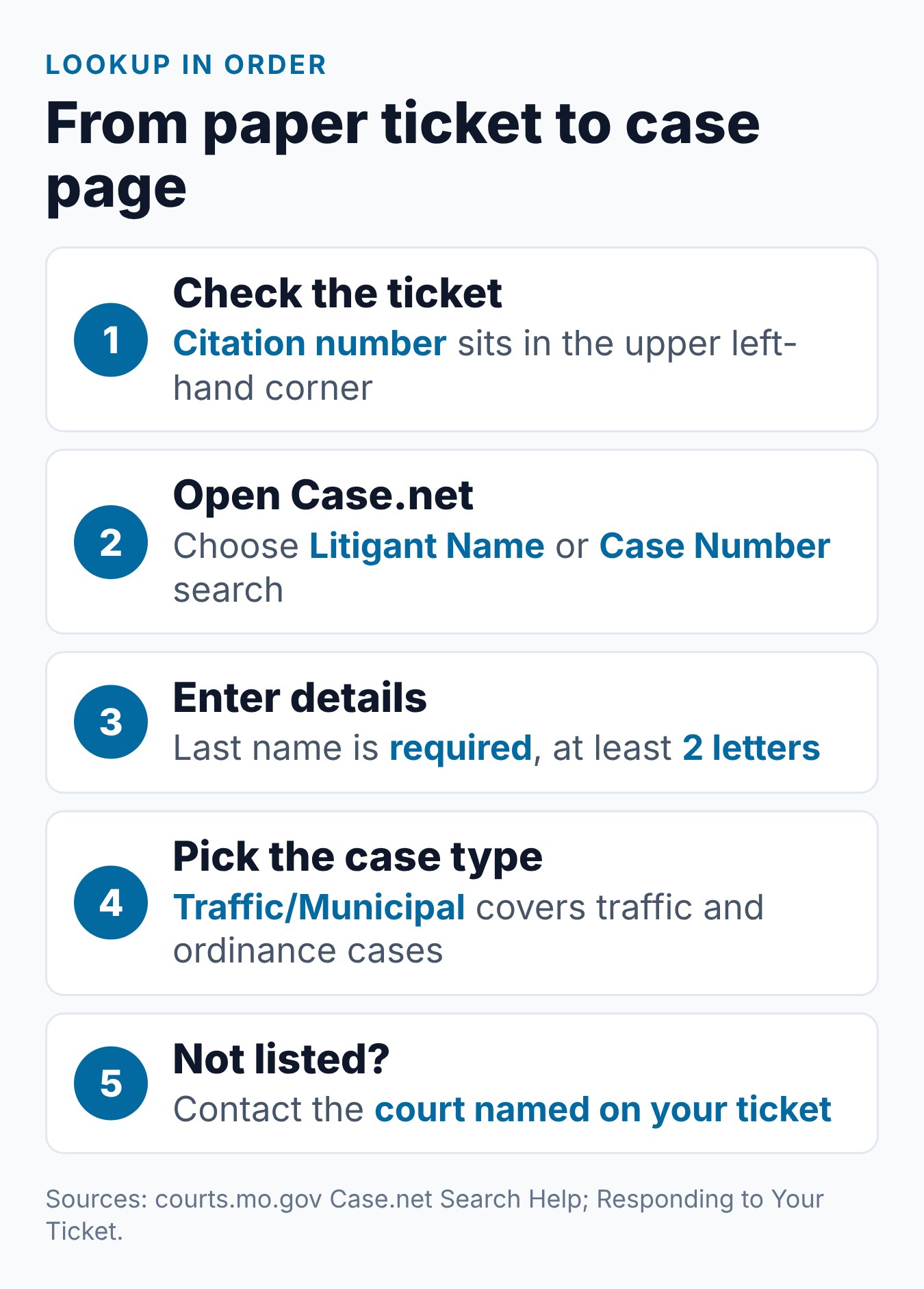
- Litigant Name Search. “The Last Name field is required.” You must enter at least 2 letters.
- Case Number Search. It is “very precise and does not allow wildcard searches,” so type the number exactly.
- Filing Date Search. The Case.net page lists it as its own search type.
- Scheduled Hearings & Trials Search. This is also listed on the Case.net page.
Traffic cases use the case type “Traffic/Municipal.” The help page describes it as “Moving and non-moving traffic or ordinance violations.”
The help page does not describe a separate search by ticket or citation number. Use your name or the court’s case number instead.
What You Need From the Paper Ticket
Your ticket holds the details the court will ask for. The courts’ Responding to Your Ticket page says: “You will need your citation number.”
On a traffic ticket, “the number is in the upper left-hand corner.” Keep that number handy when you call or pay.
Lost your copy? The same page says to search Case.net by litigant name. Also note the court name and court date if you still have them.
Seeing What You Owe
Plead and Pay shows the amount for eligible tickets. The Plead and Pay FAQ says: “If eligible, the Plead and Pay icon (see icon above) will display on your case’s page on Case.net.”
Clicking the icon gives you the total. The FAQ says “your total court costs will be provided.”
Looking is not a plea. The courts’ ticket payment page says: “If you click Plead and Pay to see your fine and court costs, you are NOT pleading guilty.”
Some tickets will not show the icon. The courts’ uniform fine schedule Q&A says: “If an offense is not on the uniform fine schedule it is not eligible to be paid through the violation bureau,” including Plead and Pay. The same Q&A says “Court costs will be added in addition to the uniform fine assessed.”
How the Fine Amount Is Set
Fines on Plead and Pay come from fine schedules. The courts’ Statewide Fine Schedule page lists a “State Traffic Fine Schedule (Effective 08-28-2021)” and a “Municipal Fine Schedule (Effective 01-01-2023).”
The schedules do not cover every case. The Q&A says “The schedule, however, does not apply if the prosecutor opts to file the violation as an information and require a court appearance.”
If you go to court instead of paying ahead, the amount can differ. The Q&A says “the judge is free to assess any fine within the statutory limits.” We do not list amounts here, because your ticket or court shows the figure for your charge.
Ways to Pay
The courts list several ways to resolve a ticket by paying. The table shows what each one does.
| Way to pay | What it is for | Plea effect |
|---|---|---|
| Plead and Pay | Eligible tickets, before court, online | Full payment is a guilty plea |
| Mail the signed plea form | The plea form with the citation, plus a check or money order | Full payment is a guilty plea |
| Pay at the court | The court listed on the citation | Full payment is a guilty plea |
| Pay By Web | “Balances owed on disposed cases” | The case is already decided |
For mail, the courts say to make the check or money order “payable to the court listed on the citation.” Card payments online carry a convenience fee.
Timing matters after a court date. The payment page says payments “must be received within 30 days following your court date to prevent a time payment fee from being charged.” Pay By Web payments “typically will be posted within one business day.”
Paying Is a Guilty Plea
Paying in full ends the case with a conviction. The courts’ Responding to Your Ticket page covers this. It says full payment through Plead and Pay “is considered a guilty plea and waiver of a court hearing.”
The court rule says the same thing. Under Supreme Court Rule 38.10, full payment before the first court date “constitutes a guilty plea and waiver of trial.”
To plead not guilty, the courts say: “You must appear on the court date and time provided on the citation.” Whether to pay or appear is your choice, so ask the court or a Missouri attorney about your own case.
If You Do Not Respond
The courts are direct about deadlines. “You MUST respond to your ticket by the court date shown on the citation.”
They also warn that failing to respond “may also result in suspension of your driver’s license” and “a warrant may be issued for your arrest.” Our guide to failing to appear in court explains the suspension steps.
If Your Court Is Not on Case.net
If your city court is not on the statewide system, Case.net will not show your case. The court named on your ticket is then the place to ask.
When you call or visit, ask for:
- The status of your case and your next court date.
- The amount owed, including court costs.
- The ways the court takes payment, such as mail or in person.
- A paid receipt once the case is closed.
Watch for Payment Scams
Real courts do not call for card numbers. The payment page says: “No one from a court will ever contact you by phone and ask for payment or credit card information.”
Do not give card details to a caller. Look up your case yourself on Case.net, or call the court using the number on your ticket.
Where the Fine Collection Center Went
Older guides mention the Fine Collection Center (FCC). The courts’ Statewide Fine Schedule page says: “Effective May 1, 2019, the Fine Collection Center (FCC) stopped accepting new citations for processing.”
Now Rule 38.10 says “Each judicial circuit shall establish by court order a circuit violations bureau in each county within the circuit.” Our guide to the FCC and the DIP covers this change.
What Reaches the DOR
Case.net shows the court side. The Missouri Department of Revenue (DOR) keeps the driving record.
After a conviction, RSMo 302.225 gives the court seven days to send it to the DOR. RSMo 302.302 says points are added “only after a conviction or forfeiture of collateral.” Speeding is 3 points under state law and 2 under a city or county ordinance.
To see what posted, call the DOR at 573-526-2407. You can also buy a driver record for $2.82 from the DOR Driver Records page, plus a $2 fee at a license office.
If you hold a license from another state, the DOR reports the Missouri conviction to your home state under RSMo 302.600. Our guide for out-of-state drivers covers that case.
What We Found on the Official Pages
On the Missouri court and DOR pages we checked on October 27, 2026, three details stood out.
- The Case.net help page lists name, case number, filing date and hearing searches. It does not describe a ticket number search.
- The payment page does not list which courts take part in Plead and Pay or Pay By Web.
- The DOR FACT FAQ tells drivers to search Case.net “by name” for ticket information.
Common Mistakes
Each item is checked against a Missouri court or DOR page:
- Assuming Case.net has every court. Only courts on the statewide system appear.
- Searching by ticket number. The help page lists name and case number searches instead.
- Treating Case.net as the official record. The courts say it is not one.
- Thinking a click is a plea. Viewing the amount is not a plea, but full payment is.
- Paying a caller. Courts never ask for card details by phone.
- Sending money to the FCC. It stopped taking new citations on May 1, 2019.
How Requirements Can Vary
Missouri’s point values, suspension levels and Driver Improvement Program rules come from Missouri law (RSMo 302.302 and 302.304) and apply statewide. Whether a court orders the DIP for your ticket, and how your case is handled, is up to the court on your ticket. Fines and court costs depend on the court and the charge.
Laws, forms and court practice can change. Check your ticket, any court order, the Missouri DOR website and the Missouri Revised Statutes before you enroll or pay.
Frequently Asked Questions
Can I look up my Missouri traffic ticket online?
Yes, if your court uses the statewide case system. Search Case.net by your name or by the exact case number. If your city court is not on it, contact the court named on your ticket.
Can I search Case.net by ticket number?
The Case.net help page does not describe a ticket or citation number search. It lists name, case number, filing date and hearing searches.
Why can’t I find my ticket on Case.net?
Some city courts do not use the statewide system, so their cases do not appear. Call the court printed on your ticket.
Is clicking Plead and Pay a guilty plea?
No. The courts say clicking to see your fine and court costs is not a plea. Completing full payment is a guilty plea.
Can every Missouri ticket be paid online?
No. Plead and Pay works only for eligible tickets. Offenses not on the uniform fine schedule cannot be paid through the violations bureau or Plead and Pay.
Can I set up a payment plan online?
The Plead and Pay FAQ says: “You have to appear in court and request a payment plan.”
How soon do points show after I pay?
The court has seven days to report a conviction to the DOR under RSMo 302.225. Call the DOR at 573-526-2407 to check your point total.
Conclusion
A Missouri ticket lookup starts on Case.net, with a name or exact case number search, and the court on your ticket fills any gaps. Plead and Pay shows the amount for eligible tickets, but completing payment is a guilty plea.
For your own case, ask the court on your ticket or a Missouri attorney. If your court has ordered the DIP and you qualify, take the Missouri Driver Improvement Program online.
Related Articles
- Missouri Speeding Ticket: Costs, Points, and What to Know
- Failure to Appear in Court for a Missouri Traffic Ticket: What Happens
- Missouri Fine Collection Center: What Changed for the DIP
- Missouri Driver Improvement Program Out of State: The Rules
Sources
- Missouri Courts — Case.net
- Missouri Courts — Case.net Search Help
- Missouri Courts — Responding to Your Ticket
- Missouri Courts — Pay Tickets Online (Plead and Pay, Pay By Web)
- Missouri Courts — Plead and Pay FAQ
- Missouri Courts — Uniform Fine Schedule Questions
- Missouri Courts — Statewide Fine Schedule
- Missouri Supreme Court Rule 38.10 — Circuit Violations Bureau
- Missouri Revised Statutes 302.225 — Courts to report convictions to the Department of Revenue
- Missouri Revised Statutes 302.302 — Point system
- Missouri Revised Statutes 302.600 — Driver License Compact
- Missouri DOR — Failure to Appear in Court or Pay for Traffic Violation (FACT) FAQs
- Missouri DOR — Tickets and Points FAQs
- Missouri DOR — Driving Records
Billy Forte is the owner of Driving Logic, a driver improvement course provider serving Missouri and other U.S. states.
This article is general information, not legal advice. Driver Improvement Program rules, point values, fines and penalties depend on your ticket, court and case facts, and they can change. Use official Missouri DOR, Missouri Revised Statutes and court sources, and consult a qualified Missouri attorney for advice about your own case.